
Getting Started#
This tutorial is a starter’s guide to run a dummy experiment with Autosubmit.
Dummy experiments run workflows with inexpensive empty tasks and therefore are ideal for teaching and testing purposes.
Real experiments instead run workflows with complex tasks. To read information about how to develop parameterizable tasks for Autosubmit workflows, refer to Developing a project.
Pre-requisites#
Autosubmit needs to establish password-less SSH connections in order to run and monitor workflows on remote platforms.
Ensure that you have a password-less connection to all platforms you want to use in your experiment. If you are unsure how to do this, please follow these instructions:
Open a terminal and prompt
ssh-keygen -t rsa -b 4096 -C "email@email.com" -m PEMCopy the resulting key to your platform of choice. Via SCP or ssh-copy-key.
# Generate a key pair for password-less ssh, PEM format is recommended as others can cause problems
ssh-keygen -t rsa -b 4096 -C "email@email.com" -m PEM
# Copy the public key to the remote machine
ssh-copy-id -i ~/.ssh/id_rsa.pub user@remotehost
# Add your key to ssh agent ( if encrypted )
# If not initialized, initialize it
eval `ssh-agent -s`
# Add the key
ssh-add ~/.ssh/id_rsa
# Where ~/.ssh/id_rsa is the path to your private key
Description of most used commands#
Command |
Short description |
|---|---|
expid |
Creates a new experiment and generates a new entry in the database by giving it a serial id composed of 4 letters. In addition, it also creates the folder experiment and the basic folder structure. |
create <EXPID> |
Generates the experiment workflow. |
run <EXPID> |
Runs the experiment workflow. |
monitor <EXPID> |
Shows the experiment workflow structure and status. |
inspect <EXPID> |
Generates Autosubmit scripts and batch scripts for inspection, by processing the tasks’ templates with the experiment parameters. |
refresh <EXPID> |
Updates the project directory. |
recovery <EXPID> |
Recovers the experiment workflow obtaining the last run complete jobs. |
setstatus <EXPID> |
Sets one or multiple jobs status to a given value. |
describe <EXPID> |
Displays summary information about the experiment: owner, location, creation time, model, branch, HPC platform, and description. |
report <EXPID> |
Extracts the experiment parameters into a flat list ( |
Create a new experiment#
Example:
autosubmit expid -dm -H "local" -d "Tutorial"
-dm: Generates a dummy experiment.
-H: Sets the principal experiment platform.
-d: Sets a short description for the experiment.
The output of the command will show the <EXPID> of the experiment and generate the following directory structure:
Experiment folder |
Contains |
|---|---|
conf |
Experiment configuration files. |
pkl |
Workflow pkl files. |
plot |
Visualization output files |
tmp |
Logs, templates and misc files. |
proj |
User scripts and project code. (empty) |
Then, execute autosubmit create <EXPID> and Autosubmit will generate the workflow graph.
Run and monitoring#
To run an experiment, use
autosubmit run <EXPID>. Autosubmit runs experiments performing the following operations:
First, it checks the experiment configuration. If it is wrong, it won’t proceed further.
Second, it runs the experiment while retrieving all logs from completed or failed tasks as they run.
Third, it manages all the workflow steps by following the dependencies defined by the user until all jobs are in COMPLETED or FAILED status. There can be jobs left in WAITING status if their dependencies are in FAILED status.
While the experiment is running, it can be visualized via autosubmit monitor <EXPID>.
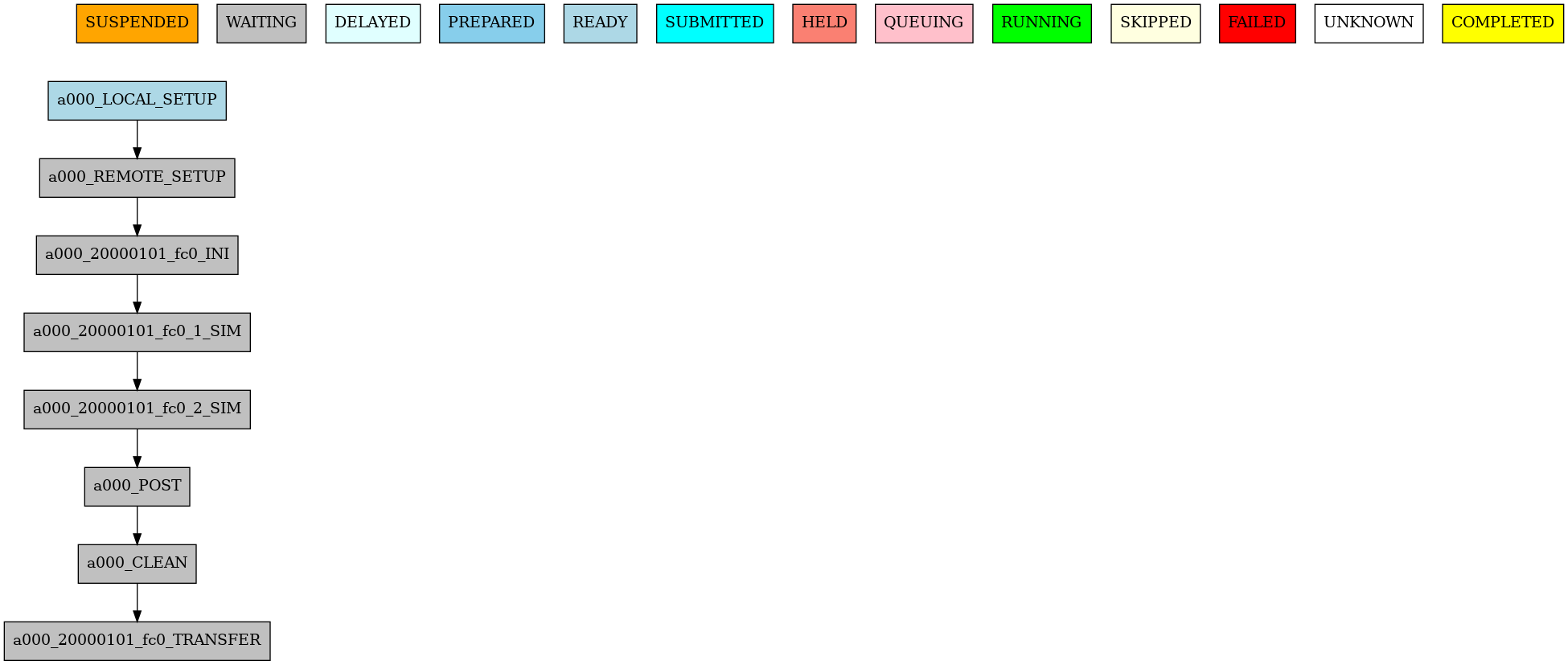
It illustrates the output of the autosubmit monitor. It describes all workflow jobs’ possible status and actual status.
Concurrently, the <EXPID>/tmp gets filled with the cmd scripts generated by Autosubmit to run the local and remote tasks (in this case, they are sent and submitted to the remote platform(s)).
Autosubmit keeps logs at ASLOGS and LOG_<EXPID> folders, which are filled up with Autosubmit’s command logs and job logs.
Viewing the logs#
The autosubmit commands such as EXPID, run, monitor, all may produce
log files on the user’s file system. To save the user from having to navigate to the
log file, or to memorize the location of these files, Autosubmit provides the
autosubmit cat-log command.
$ autosubmit cat-log a000

Output:
Autosubmit is running with 4.1.17
No logs found.
Note
The -f (--file) option is for the file type, not the file path.
See the complete help and syntax with autosubmit cat-log --help for
a list of supported types, depending on whether you choose a workflow
log or a job log file. Note too that there is a -i (--inspect)
flag in the command to tell Autosubmit you want job files generated by
autosubmit inspect, instead of job files generated by autosubmit run.
Inspecting the experiment#
Once an experiment exists on disk, two commands help you understand what it contains.
autosubmit describe <EXPID> displays information about the experiment:
its owner, location on disk, creation time, project model and branch, HPC
platform, and description.
$ autosubmit describe a000
Output:
Autosubmit is running with 4.1.17
[32mYAML configuration loaded:[0m[39m
[32m /home/docs/checkouts/readthedocs.org/user_builds/autosubmit/checkouts/latest/_readthedocs/autosubmit/autosubmit/a000/conf/as_misc.yml[0m[39m
[32m /home/docs/checkouts/readthedocs.org/user_builds/autosubmit/checkouts/latest/_readthedocs/autosubmit/autosubmit/a000/conf/autosubmit_a000.yml[0m[39m
[32m /home/docs/checkouts/readthedocs.org/user_builds/autosubmit/checkouts/latest/_readthedocs/autosubmit/autosubmit/a000/conf/expdef_a000.yml[0m[39m
[32m /home/docs/checkouts/readthedocs.org/user_builds/autosubmit/checkouts/latest/_readthedocs/autosubmit/autosubmit/a000/conf/jobs_a000.yml[0m[39m
[32m /home/docs/checkouts/readthedocs.org/user_builds/autosubmit/checkouts/latest/_readthedocs/autosubmit/autosubmit/a000/conf/platforms_a000.yml[0m[39m
[32mPartial configuration validated correctly[0m[39m
[32mDescribing a000[0m[39m
[32mOwner: docs[0m[39m
[32mLocation: /home/docs/checkouts/readthedocs.org/user_builds/autosubmit/checkouts/latest/_readthedocs/autosubmit/autosubmit/a000[0m[39m
[32mCreated: 2026-07-23 15:28:16.326881[0m[39m
[32mModel: Not Found[0m[39m
[32mBranch: Not Found[0m[39m
[32mHPC: LOCAL[0m[39m
[32mDescription: Tutorial[0m[39m
('docs', datetime.datetime(2026, 7, 23, 15, 28, 16, 326881), 'Not Found', 'Not Found', 'LOCAL')
autosubmit report <EXPID> extracts the experiment variables. It has two
modes that can be used together:
-allwrites every available parameter to<EXPID>_parameter_list_<timestamp>.txt.-t <template>renders a user-supplied template, substituting%KEY%markers with values, into<EXPID>_report_<timestamp>.
Both files land in <EXPID>/tmp/ by default.
autosubmit report a000 -all
autosubmit report a000 -t conf/report-template.txt
For the template syntax and a starter template, see Monitor and Check Experiments.
Configuration summary#
In the folder
<EXPID>/confthere are different files that define the actual experiment configuration.
File |
Content |
|---|---|
|
|
|
|
|
|
|
|
|
|
Final step: Modify and run#
It is time to look into the configuration files of the dummy experiment and modify them with a remote platform to run a workflow with a few more chunks.
Open expdef_<EXPID>.yml
$ cat /home/docs/autosubmit/a000/conf/expdef_a000.yml

Output:
cat: /home/docs/autosubmit/a000/conf/expdef_a000.yml: No such file or directory
Now open platforms_<EXPID>.yml. Note: This will be an example for marenostrum4
$ cat /home/docs/autosubmit/a000/conf/platforms_a000.yml

Output:
cat: /home/docs/autosubmit/a000/conf/platforms_a000.yml: No such file or directory
autosubmit create <EXPID> will generate the new workflow and autosubmit run <EXPID> will run the experiment with the latest changes.
If you want to visualize the workflow when creating it, use the command autosubmit create <EXPID> -plt instead.
Warning
If you are using an encrypted key, you will need to add it to the ssh-agent before running the experiment. To do so, run ssh-add <path_to_key>.