How to add a new job
To add a new job, open the <experiments_directory>/cxxx/conf/jobs_cxxx.conf file where cxxx is the experiment identifier and add this text:s
[new_job]
FILE = <new_job_template>
This will create a new job named “new_job” that will be executed once at the default platform. This job will user the template located at <new_job_template> (path is relative to project folder).
This is the minimum job definition and usually is not enough. You usually will need to add some others parameters:
PLATFORM: allows you to execute the job in a platform of your choice. It must be defined in the experiment’s platforms.conf file or to have the value ‘LOCAL’ that always refer to the machine running Autosubmit
RUNNING: defines if jobs runs only once or once per start-date, member or chunk. Options are: once, date, member, chunk
DEPENDENCIES: defines dependencies from job as a list of parents jobs separated by spaces. For example, if ‘new_job’ has to wait for “old_job” to finish, you must add the line “DEPENDENCIES = old_job”.
- For dependencies to jobs running in previous chunks, members or start-dates, use -(DISTANCE). For example, for a job “SIM” waiting for
- the previous “SIM” job to finish, you have to add “DEPENDENCIES = SIM-1”.
- For dependencies that are not mandatory for the normal workflow behaviour, you must add the char ‘?’ at the end of the dependency.
SELECT_CHUNKS (optional): by default, all sections depend on all jobs the items specified on the DEPENDENCIES parameter. However, with this parameter, you could select the chunks of a specific job section. At the end of this doc, you will find diverse examples of this feature. The syntaxis is as follows:
[jobs]
SELECT_CHUNKS = SIM*[1]*[3] # Enables the dependency of  chunk 1 with chunk 3. While chunks 2,4  won't be linked.
SELECT_CHUNKS = SIM*[1:3] # Enables the dependency of chunk 1,2 and 3. While 4 won't be linked.
SELECT_CHUNKS = SIM*[1,3] # Enables the dependency of chunk 1 and 3. While 2 and 4 won't be linked
SELECT_CHUNKS = SIM*[1] # Enables the dependency of chunk 1. While 2, 3 and 4 won't be linked
- SELECT_MEMBERS (optional): by default, all sections depend on all jobs the items specified on the DEPENDENCIES parameter. However, with this parameter, you could select the members of a specific job section. At the end of this doc, you will find diverse examples of this feature. Caution, you must pick the member index, not the member name.
[expdef.conf]
...
MEMBERS = AA BB CC DD
...
[jobs.conf]
SELECT_MEMBERS = SIM*[1]*[3] # Enables the dependency of member BB with member DD. While AA and CC won't be linked.
SELECT_MEMBERS = SIM*[1:3] # Enables the dependency of member  BB,CC and DD. While AA won't be linked.
SELECT_MEMBERS = SIM*[1,3] # Enables the dependency of member BB and DD. While AA and CC won't be linked
SELECT_MEMBERS = SIM*[1] # Enables the dependency of member BB. While AA, CC and DD won't be linked
- EXCLUDED_CHUNKS (optional): With this parameter, you can prevent the generation of jobs for a list of chunks.
- EXCLUDED_MEMBERS (optional): With this parameter, you can prevent the generation of jobs for a list of members.
For jobs running in HPC platforms, usually you have to provide information about processors, wallclock times and more. To do this use:
- WALLCLOCK: wallclock time to be submitted to the HPC queue in format HH:MM
- PROCESSORS: processors number to be submitted to the HPC. If not specified, defaults to 1.
- THREADS: threads number to be submitted to the HPC. If not specified, defaults to 1.
- TASKS: tasks number to be submitted to the HPC. If not specified, defaults to 1.
- HYPERTHREADING: Enables Hyperthreading, this will double the max amount of threads. defaults to false. ( Not avaliable on slurm platforms )
- QUEUE: queue to add the job to. If not specificied, uses PLATFORM default.
- RETRIALS: Number of retrials if job fails
- DELAY_RETRY_TIME: Allows to put a delay between retries. Triggered when a job fails. If not specified, Autosubmit will retry the job as soon as possible. Accepted formats are: plain number (there will be a constant delay between retrials, of as many seconds as specified), plus (+) sign followed by a number (the delay will steadily increase by the addition of these number of seconds), or multiplication (*) sign follows by a number (the delay after n retries will be the number multiplied by 10*n). Having this in mind, the ideal scenario is to use +(number) or plain(number) in case that the HPC has little issues or the experiment will run for a little time. Otherwise, is better to use the *(number) approach.
#DELAY_RETRY_TIME = 11
#DELAY_RETRY_TIME = +11 # will wait 11 + number specified
#DELAY_RETRY_TIME = *11 # will wait 11,110,1110,11110...* by 10 to prevent a too big number
There are also other, less used features that you can use:
- FREQUENCY: specifies that a job has only to be run after X dates, members or chunk. A job will always be created for the last one. If not specified, defaults to 1
- SYNCHRONIZE: specifies that a job with RUNNING=chunk, has to synchronize its dependencies chunks at a ‘date’ or ‘member’ level, which means that the jobs will be unified: one per chunk for all members or dates. If not specified, the synchronization is for each chunk of all the experiment.
- RERUN_ONLY: determines if a job is only to be executed in reruns. If not specified, defaults to false.
- CUSTOM_DIRECTIVES: Custom directives for the HPC resource manager headers of the platform used for that job.
- SKIPPABLE: When this is true, the job will be able to skip it work if there is an higher chunk or member already ready, running, queuing or in complete status.
- EXPORT: Allows to run an env script or load some modules before running this job.
- EXECUTABLE: Allows to wrap a job for be launched with a set of env variables.
- QUEUE: queue to add the job to. If not specificied, uses PLATFORM default.
Workflow examples:
Example 1:
In this first example, you can see 3 jobs in which last job (POST) shows an example with select chunks:
[INI]
FILE = templates/common/ini.tmpl.sh
RUNNING = member
WALLCLOCK = 00:30
QUEUE = debug
CHECK = true

[SIM]
FILE = templates/ecearth3/ecearth3.sim
DEPENDENCIES = INI
RUNNING = chunk
WALLCLOCK = 04:00
PROCESSORS = 1616
THREADS = 1

[POST]
FILE = templates/common/post.tmpl.sh
DEPENDENCIES =  SIM
RUNNING = chunk
WALLCLOCK = 01:00
QUEUE = Debug
check = true
# Then you can select the specific chunks of dependency SIM with one of those lines:

SELECT_CHUNKS = SIM*[1]*[3] # Will do the dependency of chunk 1 and chunk 3. While chunks 2,4  won't be linked.
SELECT_CHUNKS = SIM*[1:3] #Enables the dependency of chunk 1,2 and 3. While 4 won't be linked.
SELECT_CHUNKS = SIM*[1,3] #Enables the dependency of chunk 1 and 3. While 2 and 4 won't be linked
SELECT_CHUNKS = SIM*[1] #Enables the dependency of chunk 1. While 2, 3 and 4 won't be linked
Example 2: select_chunks
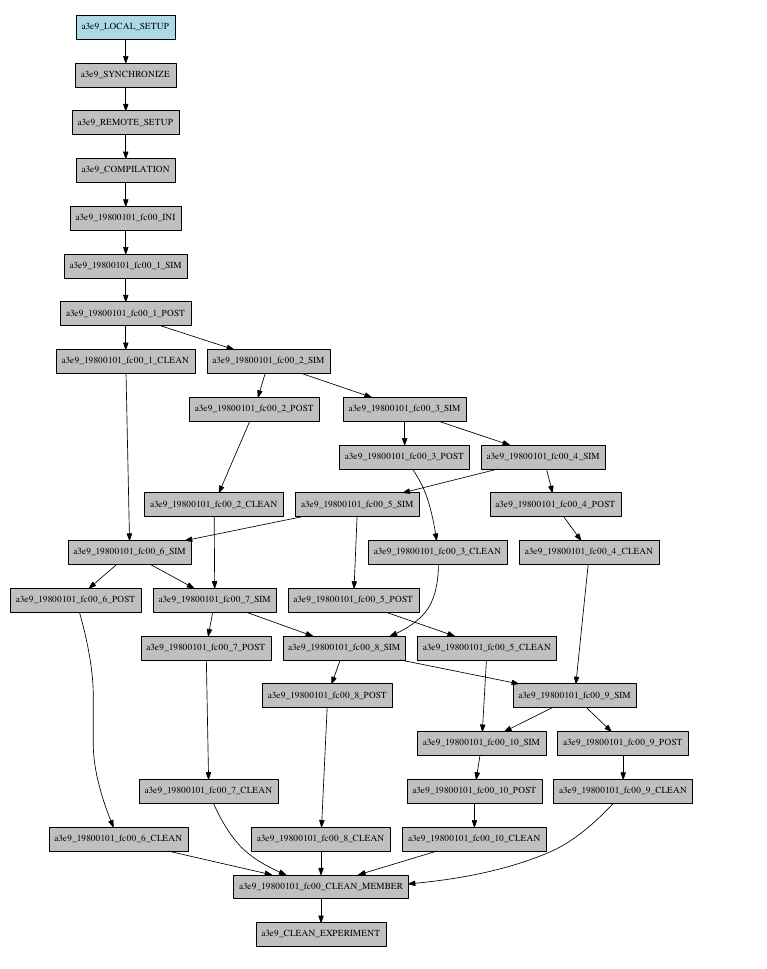
In this workflow you can see an illustrated example of select_chunks used in an actual workflow, to avoid an excess of information we only will see the configuration of a single job:
[SIM]
FILE = templates/sim.tmpl.sh
DEPENDENCIES = INI SIM-1 POST-1 CLEAN-5
SELECT_CHUNKS = POST*[1]
RUNNING = chunk
WALLCLOCK = 0:30
PROCESSORS = 768
Example 3: SKIPPABLE
In this workflow you can see an illustrated example of SKIPPABLE parameter used in an dummy workflow.
[SIM]
FILE = sim.sh
DEPENDENCIES = INI POST-1
WALLCLOCK = 00:15
RUNNING = chunk
QUEUE = debug
SKIPPABLE = TRUE

[POST]
FILE = post.sh
DEPENDENCIES = SIM
WALLCLOCK = 00:05
RUNNING = member
#QUEUE = debug

Example 4: Weak dependencies
In this workflow you can see an illustrated example of weak dependencies.
Weak dependencies, work like this way:
- X job only has one parent. X job parent can have “COMPLETED or FAILED” as status for current job to run.
- X job has more than one parent. One of the X job parent must have “COMPLETED” as status while the rest can be “FAILED or COMPLETED”.
[GET_FILES]
FILE = templates/fail.sh
RUNNING = chunk

[IT]
FILE = templates/work.sh
RUNNING = chunk
QUEUE = debug

[CALC_STATS]
FILE = templates/work.sh
DEPENDENCIES = IT GET_FILES?
RUNNING = chunk
SYNCHRONIZE = member

Example 5: Select Member
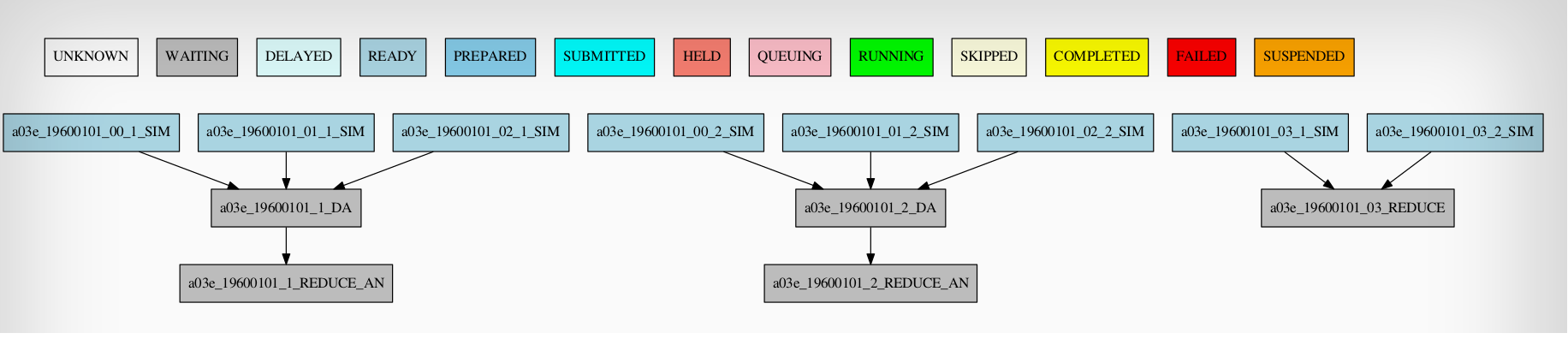
In this workflow you can see an illustrated example of select member. Using 4 members 1 datelist and 4 different job sections.
Expdef:
[experiment]
DATELIST = 19600101
MEMBERS = 00 01 02 03
CHUNKSIZE = 1
NUMCHUNKS = 2
Jobs_conf:
[SIM]
...
RUNNING = chunk
QUEUE = debug

[DA]
...
DEPENDENCIES = SIM
SELECT_MEMBERS = SIM*[0:2]
RUNNING = chunk
SYNCHRONIZE = member

[REDUCE]
...
DEPENDENCIES = SIM
SELECT_MEMBERS = SIM*[3]
RUNNING = member
FREQUENCY = 4

[REDUCE_AN]
...
FILE = templates/05b_sim.sh
DEPENDENCIES = DA
RUNNING = chunk
SYNCHRONIZE = member