
Defining the workflow#
One of the most important steps that you have to do when planning to use autosubmit for an experiment is the definition of the workflow the experiment will use. In this section, you will learn about the workflow definition syntax so you will be able to exploit autosubmit’s full potential.
Warning
This section is NOT intended to show how to define your jobs. Please go to Getting Started section for a comprehensive list of job options.
Simple workflow#
The simplest workflow that can be defined is a sequence of two jobs, with the second one triggering at the end of
the first. To define it, we define the two jobs and then add a DEPENDENCIES attribute to the second job referring to the
first one.
It is important to remember when defining workflows that DEPENDENCIES on autosubmit always refer to jobs that should
be finished before launching the job that has the DEPENDENCIES attribute.
JOBS:
  ONE:
    FILE: one.sh

  TWO:
    FILE: two.sh
    DEPENDENCIES: One
The resulting workflow can be seen in 1.

1 Example showing a simple workflow with two sequential jobs#
Running jobs once per startdate, member or chunk#
Autosubmit is capable of running ensembles made of various startdates and members. It also has the capability to divide member execution on different chunks.
To set at what level a job has to run you have to use the RUNNING attribute. It has four possible values: once, date,
member and chunk corresponding to running once, once per startdate, once per member or once per chunk respectively.
EXPERIMENT:
  DATELIST: 19900101 20000101
  MEMBERS: Member1 Member2
  CHUNKSIZEUNIT: month
  CHUNKSIZE: '4'
  NUMCHUNKS: '2'
  CHUNKINI: ''
  CALENDAR: standard

JOBS:
  ONCE:
      FILE: Once.sh

  DATE:
      FILE: date.sh
      DEPENDENCIES: once
      RUNNING: date

  MEMBER:
      FILE: Member.sh
      DEPENDENCIES: date
      RUNNING: member

  CHUNK:
      FILE: Chunk.sh
      DEPENDENCIES: member
      RUNNING: chunk
The resulting workflow can be seen in 2.

2 Example showing how to run jobs once per startdate, member or chunk.#
Dependencies#
Dependencies on autosubmit were introduced on the first example, but in this section you will learn about some special cases that will be very useful on your workflows.
Dependencies with previous jobs#
Autosubmit can manage dependencies between jobs that are part of different chunks, members or startdates. The next
example will show how to make a simulation job wait for the previous chunk of the simulation. To do that, we add
sim-1 on the DEPENDENCIES attribute. As you can see, you can add as much dependencies as you like separated by spaces
EXPERIMENT:
  DATELIST: 19900101
  MEMBERS: Member1 Member2
  CHUNKSIZEUNIT: month
  CHUNKSIZE: 1
  NUMCHUNKS: 5
  CHUNKINI: ''
  CALENDAR: standard

JOBS:
  INI:
    FILE: ini.sh
    RUNNING: member

  SIM:
    FILE: sim.sh
    DEPENDENCIES: ini sim-1
    RUNNING: chunk

  POSTPROCESS:
    FILE: postprocess.sh
    DEPENDENCIES: sim
    RUNNING: chunk
The resulting workflow can be seen in 3 for an experiment with 2 startdates, 2 members per startdate and 2 chunks per member.
Warning
Autosubmit simplifies the dependencies, so the final graph usually does not show all the lines that you may expect to see. In this example you can see that there are no lines between the ini and the sim jobs for chunks 2 to 5 because that dependency is redundant with the one on the previous sim
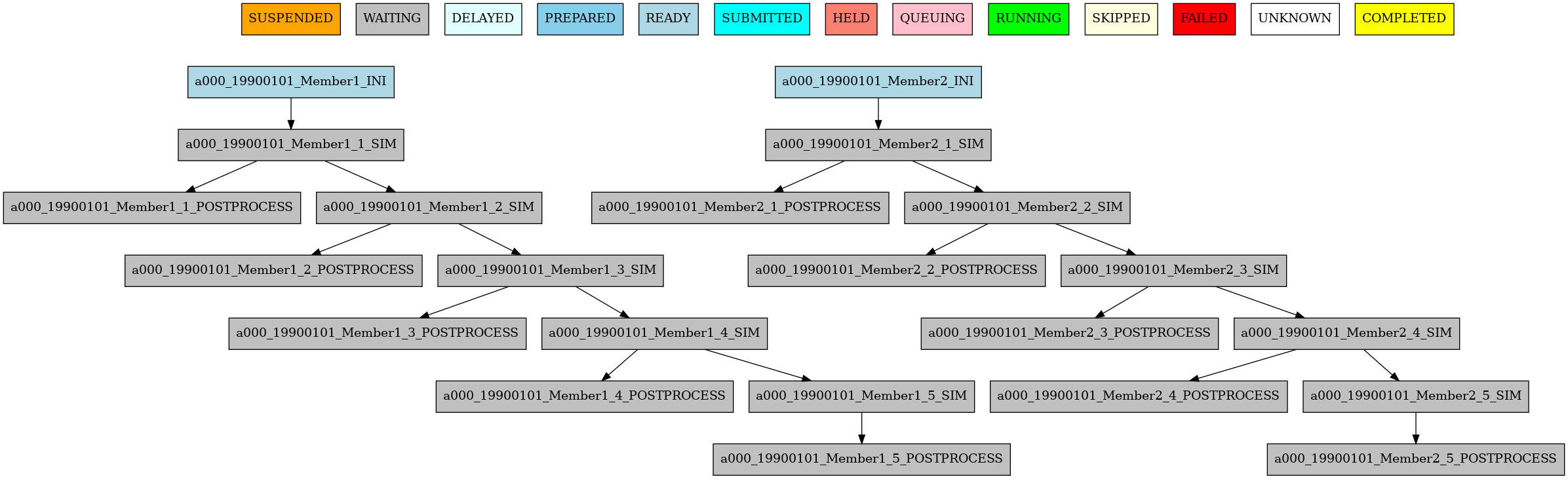
3 Example showing dependencies between sim jobs on different chunks.#
Dependencies between running levels#
As seen on the previous examples, jobs can run at different levels (for example: member or chunk levels),
and dependencies behave differently depending on this.
If a job depends on a higher-level job (e.g. a
chunkjob depends on amemberjob): the low-level job will wait for ONLY ITS DEPENDENCIES high-level jobs to be finished. That is the case on theini sim-1dependency of 3. Joba000_19900101_Member1_SIM(chunk level) must wait for joba000_19900101_Member1_INI(member level) to be finished before being launched.If a job depends on a lower-level job (e.g. a
memberjob depends on achunkjob): the high-level job will wait for ALL the low-level jobs to be finished. In 4 you can see thata000_19900101_Member1_COMBINEjob (member level) must wait for botha000_19900101_Member1_1_POSTPROCESSanda000_19900101_Member1_2_POSTPROCESSjobs (chunk level) to be finished before being launched.
In short:
A lower to higher dependency will be 1-to-1: wait for one job
A higher to lower dependency will be 1-to-all: wait for all jobs
EXPERIMENT:
  DATELIST: 19900101 20000101
  MEMBERS: Member1 Member2
  CHUNKSIZEUNIT: month
  CHUNKSIZE: 4
  NUMCHUNKS: 2
  CHUNKINI: ''
  CALENDAR: standard

JOBS:
  INI:
    FILE: ini.sh
    RUNNING: member

  SIM:
    FILE: sim.sh
    DEPENDENCIES: ini sim-1
    RUNNING: chunk

  POSTPROCESS:
    FILE: postprocess.sh
    DEPENDENCIES: sim
    RUNNING: chunk

  COMBINE:
    FILE: combine.sh
    DEPENDENCIES: postprocess
    RUNNING: member
The resulting workflow can be seen in 4.

4 Example showing dependencies between jobs running at different levels.#
Dependencies rework#
The DEPENDENCIES key is used to define the dependencies of a job. It can be used in the following ways:
Basic: The dependencies are a list of jobs, separated by ‘’, that runs before the current task is submitted.
New: The dependencies is a list of YAML sections, separated by “\n”, that runs before the current job is submitted.
For each dependency section, you can designate the following keywords to control the current job-affected tasks:
DATES_FROM: Selects the job dates that you want to alter.MEMBERS_FROM: Selects the job members that you want to alter.CHUNKS_FROM: Selects the job chunks that you want to alter.
For each dependency section and
\*_FROMkeyword, you can designate the following keywords to control the destination of the dependency:DATES_TO: Links current selected tasks to the dependency tasks of the dates specified.MEMBERS_TO: Links current selected tasks to the dependency tasks of the members specified.CHUNKS_TO: Links current selected tasks to the dependency tasks of the chunks specified.
Important keywords for
[DATES|MEMBERS|CHUNKS]_TO:‘natural’: Will keep the default linkage. Will link if it would be normally. Example,
SIM_FC00_CHUNK_1->DA_FC00_CHUNK_1.‘all’: Will link all selected tasks of the dependency with current selected tasks. Example,
SIM_FC00_CHUNK_1->DA_FC00_CHUNK_1,DA_FC00_CHUNK_2,DA_FC00_CHUNK_3…‘none’: Will unlink selected tasks of the dependency with current selected tasks.
For the new format, consider that the priority is hierarchy and goes like this DATES_FROM -(includes)-> MEMBERS_FROM -(includes)-> CHUNKS_FROM.
You can define a
DATES_FROMinside theDEPENDENCY.You can define a
MEMBERS_FROMinside theDEPENDENCYandDEPENDENCY.DATES_FROM.You can define a
CHUNKS_FROMinside theDEPENDENCY,DEPENDENCY.DATES_FROM,DEPENDENCY.MEMBERS_FROM,DEPENDENCY.DATES_FROM.MEMBERS_FROM
Start conditions#
Sometimes you want to run a job only when a certain condition is met. For example, you may want to run a job only when a certain task is running.
This can be achieved using the START_CONDITIONS feature based on the dependencies rework.
Start conditions are achieved by adding the keyword STATUS and optionally FROM_STEP keywords into any dependency that you want.
The STATUS keyword can be used to select the status of the dependency that you want to check. The possible values ( case-insensitive ) are:
See Possible job status for a complete reference and meanings.
Values |
Description |
|---|---|
|
The task is waiting for its dependencies to be completed. |
|
The task is delayed by a delay condition. |
|
The task is prepared to be submitted. |
|
The task is ready to be submitted. |
|
The task is submitted. |
|
The task is held. |
|
The task is queuing. |
|
The task is running. |
|
The task is skipped. |
|
The task is failed. |
|
The task is unknown. |
|
The task is completed. # Default |
|
The task is suspended. |
The status are ordered, so if you select RUNNING status, the task will be run if the parent is in any of the following statuses: RUNNING, QUEUING, HELD, SUBMITTED, READY, PREPARED, DELAYED, WAITING.
JOBS:
  INI:
    FILE: ini.sh
    RUNNING: member

  SIM:
    FILE: sim.sh
    DEPENDENCIES: ini sim-1
    RUNNING: chunk

  POSTPROCESS:
    FILE: postprocess.sh
    DEPENDENCIES:
      SIM:
        STATUS: 'RUNNING'
    RUNNING: chunk
The FROM_STEP keyword can be used to select the internal step of the dependency that you want to check. The possible value is an integer. Additionally, the target dependency, must call to %AS_CHECKPOINT% inside their scripts. This will create a checkpoint that will be used to check the amount of steps processed.
JOBS:
  A:
    FILE: a.sh
    RUNNING: once
    SPLITS: 2
  A_2:
    FILE: a_2.sh
    RUNNING: once
    DEPENDENCIES:
      A:
        SPLITS_TO: '2'
        STATUS: 'RUNNING'
        FROM_STEP: 2
There is now a new function that is automatically added in your scripts which is called as_checkpoint. This is the function that is generating the checkpoint file. You can see the function below:
###################
# AS CHECKPOINT FUNCTION
###################
# Creates a new checkpoint file upon call based on the current numbers of calls to the function

AS_CHECKPOINT_CALLS=0
function as_checkpoint {
    AS_CHECKPOINT_CALLS=$((AS_CHECKPOINT_CALLS+1))
    touch ${job_name_ptrn}_CHECKPOINT_${AS_CHECKPOINT_CALLS}
}
And what you would have to include in your target dependency or dependencies is the call to this function which in this example is a.sh.
The amount of calls is strongly related to the FROM_STEP value.
$expid/proj/$projname/as.sh
##compute somestuff
as_checkpoint
## compute some more stuff
as_checkpoint
To select an specific task, you have to combine the STATUS and CHUNKS_TO , MEMBERS_TO and DATES_TO, SPLITS_TO keywords.
JOBS:
  A:
    FILE: a
    RUNNING: once
    SPLITS: 1
  B:
    FILE: b
    RUNNING: once
    SPLITS: 2
    DEPENDENCIES: A
  C:
    FILE: c
    RUNNING: once
    SPLITS: 1
    DEPENDENCIES: B
  RECOVER_B_2:
    FILE: fix_b
    RUNNING: once
    DEPENDENCIES:
      B:
        SPLITS_TO: '2'
        STATUS: 'RUNNING'
Job frequency#
Some times you just don’t need a job to be run on every chunk or member. For example, you may want to launch the postprocessing
job after various chunks have completed. This behaviour can be achieved using the FREQUENCY attribute. You can specify
an integer I for this attribute and the job will run only once for each I iterations on the running level.
Hint
You don’t need to adjust the frequency to be a divisor of the total jobs. A job will always execute at the last iteration of its running level
EXPERIMENT:
  DATELIST: 19900101
  MEMBERS: Member1 Member2
  CHUNKSIZEUNIT: month
  CHUNKSIZE: '1'
  NUMCHUNKS: '5'
  CHUNKINI: ''
  CALENDAR: standard

JOBS:
  INI:
    FILE: ini.sh
    RUNNING: member

  SIM:
    FILE: sim.sh
    DEPENDENCIES: ini sim-1
    RUNNING: chunk

  POSTPROCESS:
    FILE: postprocess.sh
    DEPENDENCIES: sim
    RUNNING: chunk
    FREQUENCY: 3

  COMBINE:
    FILE: combine.sh
    DEPENDENCIES: postprocess
    RUNNING: member
The resulting workflow can be seen in 5
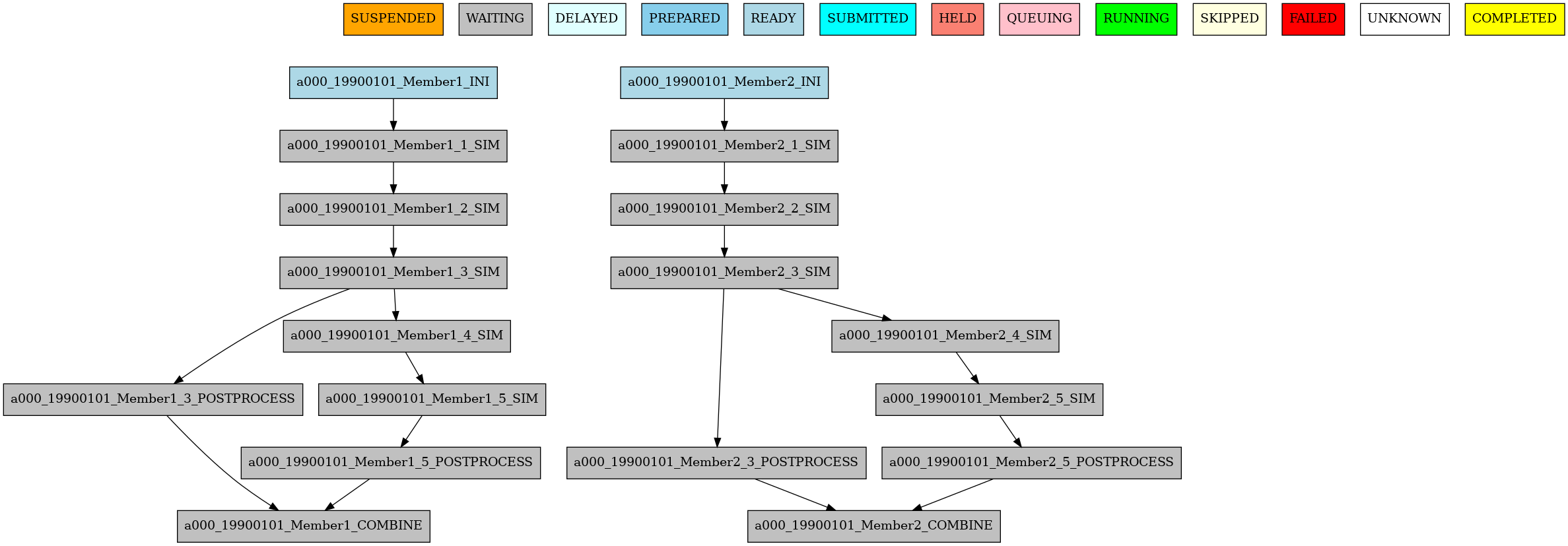
5 Example showing dependencies between jobs running at different frequencies.#
Job synchronize#
For jobs running at chunk level, and this job has dependencies, you could want
not to run a job for each experiment chunk, but to run once for all member/date dependencies, maintaining
the chunk granularity. In this cases you can use the SYNCHRONIZE job parameter to determine which kind
of synchronization do you want. See the below examples with and without this parameter.
Hint
This job parameter works with jobs with RUNNING parameter equals to ‘chunk’.
EXPERIMENT:
  DATELIST: 20000101 20010101
  MEMBERS: Member1 Member2
  CHUNKSIZEUNIT: month
  CHUNKSIZE: 1
  NUMCHUNKS: 3
  CHUNKINI: ''
  CALENDAR: standard

JOBS:
  INI:
    FILE: ini.sh
    RUNNING: member

  SIM:
    FILE: sim.sh
    DEPENDENCIES: INI SIM-1
    RUNNING: chunk

  ASIM:
    FILE: asim.sh
    DEPENDENCIES: SIM
    RUNNING: chunk
The resulting workflow can be seen in 6

6 Example showing dependencies between chunk jobs running without synchronize.#
ASIM:
    FILE: asim.sh
    DEPENDENCIES: SIM
    RUNNING: chunk
    SYNCHRONIZE: member
The resulting workflow of setting SYNCHRONIZE parameter to ‘member’ can be seen in 7
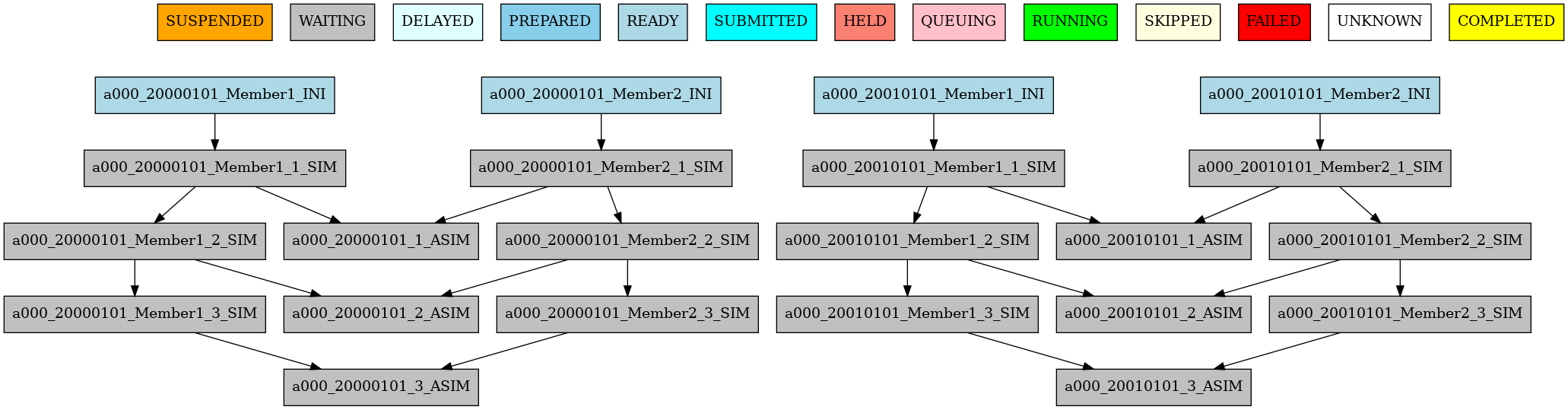
7 Example showing dependencies between chunk jobs running with member synchronize.#
ASIM:
    FILE: asim.sh
    DEPENDENCIES: SIM
    RUNNING: chunk
    SYNCHRONIZE: date
The resulting workflow of setting SYNCHRONIZE parameter to ‘date’ can be seen in 8
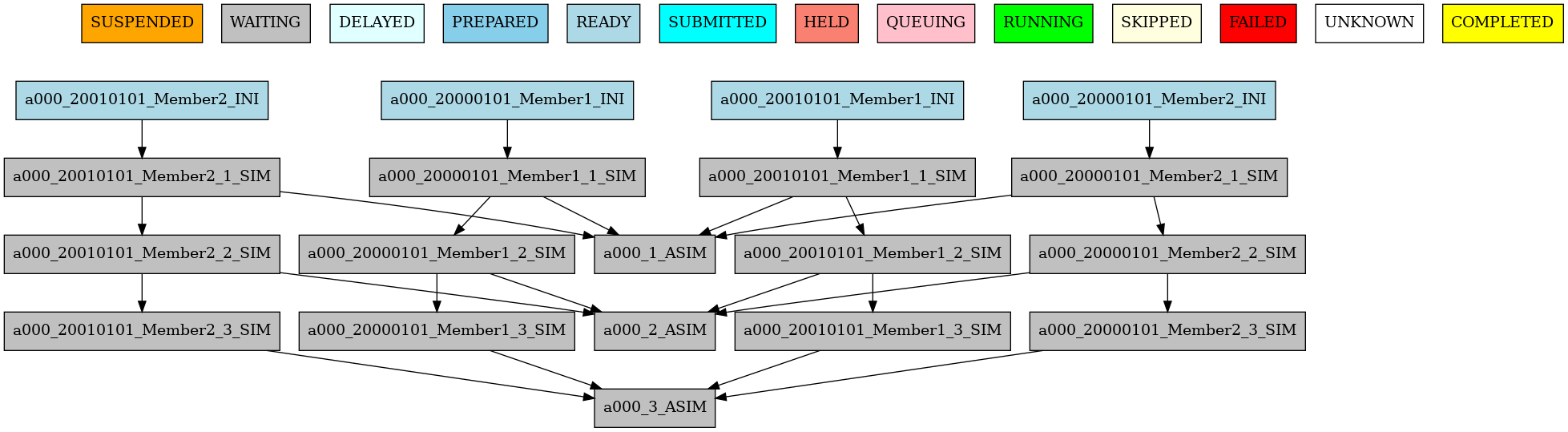
8 Example showing dependencies between chunk jobs running with date synchronize.#
Job split#
For jobs running at any level (once, date, member, chunk), you can split each logical task into
multiple sub-tasks with the SPLITS attribute.
This is useful when you want multiple tasks to be run in parallel (e.g. multiple independent APP instances for the same chunk).
Basic behavior#
SPLITS: N: withN >= 2, createsNsplit jobs per task.SPLITS: 1: no split, the job will run as a single task.SPLITS: auto: only valid withRUNNING: chunk. The number of splits is computed automatically from calendar settings.
How split dependencies are resolved#
When a child job depends on a parent job and both have splits, Autosubmit decides parent-child split links using
SPLITS_FROM and SPLITS_TO:
SPLITS_FROMselects child splits where a rule applies.SPLITS_TOselects parent splits to connect for that child selection.
If a child split is not selected by any SPLITS_FROM rule, Autosubmit will link it to all parent splits by default.
Supported values in SPLITS_FROM and SPLITS_TO
SPLITS_FROM (child selection):
all: apply the rule to all child splits.explicit indices/ranges, for example
1,2,3or[1:3]. Only positive numbers are accepted as range limits.
SPLITS_TO (parent selection/mapping):
all: connect to all parent splits.none: connect to no parent splits.natural: keep natural/default split linkage.previous: connect child splitito parent spliti-1if it exists.explicit indices/ranges, for example
1,2,3or[1:3].open ranges, for example
[2:-1]or[2:auto]. Accepted keywords for last split index areauto,last, and-1.
Advanced mapping syntax in SPLITS_TO:
K*: index-based mapping for indexK. For example,2*maps child split 2 to parent split 2.[A:B]*\G: grouped mapping with group sizeG. This is useful for N-to-1 and 1-to-N relationships.
Note
none and natural are accepted in both SPLITS_FROM and SPLITS_TO.
In practice, they are most useful in SPLITS_TO:
SPLITS_TO: noneremoves parent split links for the selected child splits.SPLITS_TO: naturalkeeps the default split linkage.
For SPLITS_FROM selection, prefer explicit indices/ranges when possible for clearer and more predictable rules.
Hint
Expressions containing * and \ should be quoted in YAML.
Example: '[1:auto]*\1'.
Example 1: explicit split mapping
EXPERIMENT:
  DATELIST: 19600101
  MEMBERS: '00'
  CHUNKSIZEUNIT: day
  CHUNKSIZE: '1'
  NUMCHUNKS: '2'
  CALENDAR: standard

JOBS:
  FIRST:
    FILE: FIRST.sh
    RUNNING: once

  SECOND:
    FILE: SECOND.sh
    DEPENDENCIES: FIRST SECOND-1
    RUNNING: once

  THIRD:
    FILE: THIRD.sh
    DEPENDENCIES: SECOND THIRD-1
    RUNNING: once
    SPLITS: 3

  FOURTH:
    FILE: FOURTH.sh
    RUNNING: once
    DEPENDENCIES:
      THIRD:
        SPLITS_FROM:
          2,3: # [2:3] is also valid
            SPLITS_TO: 1,2*,3* # 1,[2:3]* is also valid, you can also specify the step with [2:3:step]
    SPLITS: 3
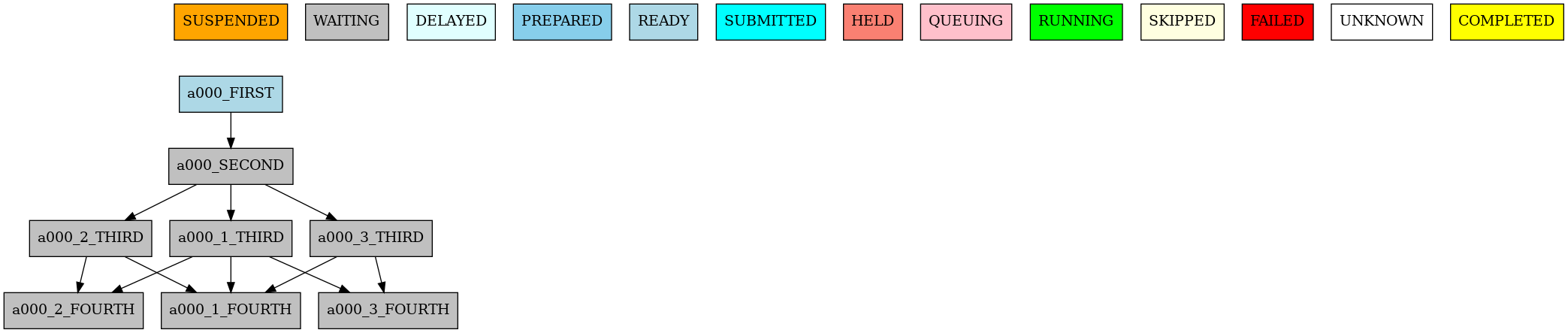
9 Example showing dependencies between jobs with different split relationships.#
In this example:
FOURTHjob will be split into 3 parts.FOURTHjob split 1 will depend on all the splits of theTHIRDjob due to not being present inSPLITS_FROM(default split linkage).FOURTHjob split 2 will depend on the splits 1 and 2 of theTHIRDjob due to the 2* mapping.FOURTHjob split 3 will depend on the splits 1 and 3 of theTHIRDjob due to the 3* mapping.
Example 2: 1-to-1 dependency
JOBS:
  TEST:
    FILE: TEST.sh
    RUNNING: once
    SPLITS: 2
    WALLCLOCK: 00:30

  TEST2:
    FILE: TEST2.sh
    DEPENDENCIES:
      TEST:
        SPLITS_FROM:
          all:
            SPLITS_TO: '[1:auto]*\1'
    RUNNING: once
    SPLITS: 2
    WALLCLOCK: 00:30

10 Example showing dependencies between jobs with 1-to-1 split relationships.#
In this example:
TESTandTEST2jobs will be split into 2 parts each.[1:auto]*\1mapping creates one-to-one mapping across all existing splits indices.So
TEST2job split 1 will depend onTESTjob split 1 andTEST2job split 2 will depend onTESTjob split 2.
Example 3: N-to-1 dependency
JOBS:
  TEST_DEPENDENCY:
    SCRIPT: TEST_DEPENDENCY.sh
    RUNNING: once
    SPLITS: '4'

  TEST_DEPENDENCY2:
    SCRIPT: TEST_DEPENDENCY2.sh
    DEPENDENCIES:
      TEST_DEPENDENCY:
        SPLITS_FROM:
          '[1:2]':
            SPLITS_TO: '[1:4]*\2'
    RUNNING: once
    SPLITS: '2'

11 Example showing dependencies between jobs with N-to-1 split relationships.#
In this example:
TEST_DEPENDENCYjob will be split into 4 parts andTEST_DEPENDENCY2job will be split into 2 parts.[1:4]*\2mapping creates a grouped mapping with group size 2.So split 1 of
TEST_DEPENDENCY2job will depend on splits 1 and 2 ofTEST_DEPENDENCYjob and split 2 ofTEST_DEPENDENCY2job will depend on splits 3 and 4 ofTEST_DEPENDENCYjob.
Example 4: 1-to-N dependency
JOBS:
  TEST:
    FILE: TEST.sh
    RUNNING: once
    SPLITS: '2'

  TEST2:
    FILE: TEST2.sh
    DEPENDENCIES:
      TEST:
        SPLITS_FROM:
          '[1:4]':
            SPLITS_TO: '[1:2]*\2'
    RUNNING: once
    SPLITS: '4'

12 Example showing dependencies between jobs with 1-to-N split relationships.#
In this example:
TESTjob will be split into 2 parts andTEST2job will be split into 4 parts.[1:2]*\2mapping creates a grouped mapping with group size 2.So splits 1 and 2 of
TEST2job will depend on split 1 ofTESTjob and splits 3 and 4 ofTEST2job will depend on split 2 ofTESTjob.
Example 5: using previous and none
JOBS:
  A:
    FILE: A.sh
    RUNNING: once
    SPLITS: 4

  B:
    FILE: B.sh
    RUNNING: once
    SPLITS: 4
    DEPENDENCIES:
      A:
        SPLITS_FROM:
          '[2:-1]':
            SPLITS_TO: previous
          '1':
            SPLITS_TO: none

13 Example showing dependencies between jobs using ‘previous’ and ‘none’ split mapping.#
In this example:
Bsplit 1 has no dependency onA(none).Bsplit 2 depends onAsplit 1.Bsplit 3 depends onAsplit 2.Bsplit 4 depends onAsplit 3.
Example 6: previous-N split dependency
The previous keyword in SPLITS_TO links each split to its immediately preceding split.
The generalised form previous-N links each split to the split that is N positions earlier.
In the example below DN uses previous (= previous-1) for its own self-dependency while
POST uses previous-2 for its dependency on DN and previous for its self-dependency.
EXPERIMENT:
  DATELIST: 19900101
  MEMBERS: fc0
  CHUNKSIZEUNIT: day
  CHUNKSIZE: 1
  NUMCHUNKS: 1
  CALENDAR: standard

JOBS:
  DN:
    FILE: dn.sh
    RUNNING: chunk
    SPLITS: 4
    DEPENDENCIES:
      DN:
        SPLITS_FROM:
          all:
            SPLITS_TO: previous       # same as previous-1

  POST:
    FILE: post.sh
    RUNNING: chunk
    SPLITS: 4
    DEPENDENCIES:
      DN:
        SPLITS_FROM:
          all:
            SPLITS_TO: previous-2     # each POST split waits for DN split N-2
      POST:
        SPLITS_FROM:
          all:
            SPLITS_TO: previous       # each POST split waits for POST split N-1
Note
SPLITS_TO: previous and SPLITS_TO: previous-1 are identical. Use previous-N with
N > 1 when you need a larger look-back window between splits.
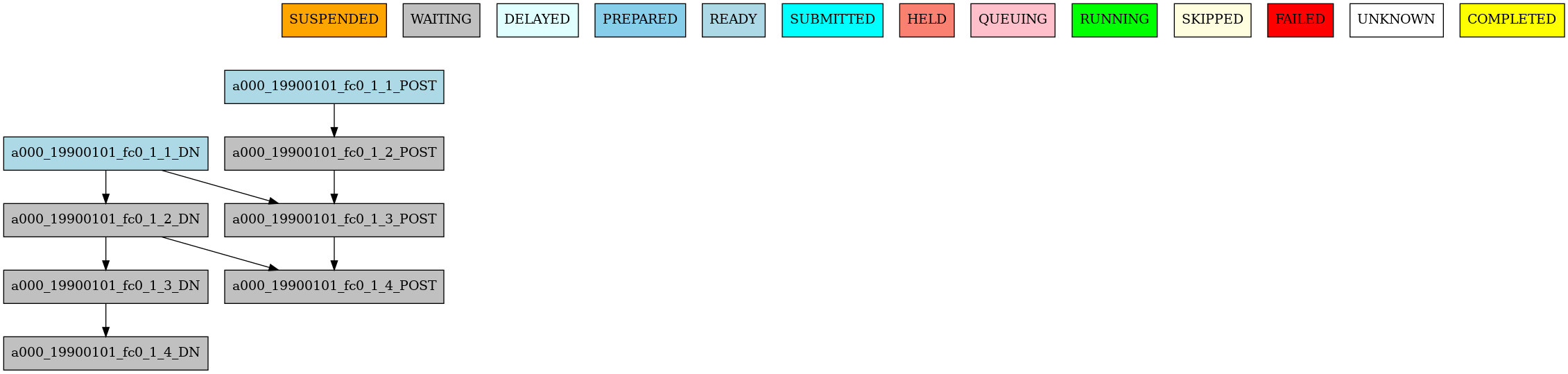
14 Example showing ``previous`` (``previous-1``) and ``previous-2`` split dependencies.#
Job Splits with calendar#
SPLITS: auto lets Autosubmit compute the split count from calendar configuration.
This mode requires RUNNING: chunk. This is useful for instance when you want to split a monthly chunk into daily splits, but you don’t want to compute the exact amount of days for each month.
Autosubmit computes split count from:
CHUNKSIZEandCHUNKSIZEUNIT: defines the chunk size of the experiment. For example, if you have a monthly experiment, you can setCHUNKSIZE: 1andCHUNKSIZEUNIT: month.SPLITSIZEandSPLITSIZEUNIT: defines the size of each split. For example, if you want each split to cover 15 days, you can setSPLITSIZE: 15andSPLITSIZEUNIT: day.SPLITPOLICY:flexible(default) orstrict.flexible: rounds up when the division is not exact.strict: requires an exact division; otherwise workflow creation fails.
Notes:
SPLITSIZEUNITcannot be larger thanCHUNKSIZEUNITCHUNKSIZEUNITin hours is not supported for auto splits.
Quick example: simple auto split
EXPERIMENT:
  DATELIST: 19900101
  MEMBERS: fc0
  CHUNKSIZEUNIT: day
  CHUNKSIZE: 30
  SPLITSIZEUNIT: day
  SPLITSIZE: 15
  SPLITPOLICY: flexible
  NUMCHUNKS: 1
  CALENDAR: standard

JOBS:
  DN:
    FILE: dn.sh
    RUNNING: chunk
    SPLITS: auto

15 Simple example showing automatically computed splits based on calendar settings.#
In this example:
The experiment has a chunk size of 30 days and a split size of 15 days.
The
DNjob will be split into 2 parts, with the first split covering days 1-15 and the second split covering days 16-30.
Detailed example: auto split with split-aware dependencies
EXPERIMENT:
  DATELIST: 19900101
  MEMBERS: fc0
  CHUNKSIZEUNIT: month
  SPLITSIZEUNIT: day
  CHUNKSIZE: 1
  SPLITSIZE: 15
  SPLITPOLICY: flexible
  NUMCHUNKS: 2
  CALENDAR: standard

JOBS:
  APP:
    FILE: app.sh
    FOR:
      DEPENDENCIES:
      - APP_ENERGY_ONSHORE:
          SPLITS_FROM:
            all:
              SPLITS_TO: previous
        OPA_ENERGY_ONSHORE_1:
          SPLITS_FROM:
            all:
              SPLITS_TO: all
        OPA_ENERGY_ONSHORE_2:
          SPLITS_FROM:
            all:
              SPLITS_TO: all
      NAME: '%RUN.APP_NAMES%'
      SPLITS: '[1]'
    PLATFORM: 'local'
    RUNNING: chunk
    WALLCLOCK: 00:05
  DN:
    DEPENDENCIES:
      APP_ENERGY_ONSHORE-1:
        SPLITS_TO: '1'
      DN:
        SPLITS_FROM:
          all:
            SPLITS_TO: previous
    FILE: dn.sh
    PLATFORM: 'local'
    RUNNING: chunk
    SPLITS: auto
    WALLCLOCK: 00:05
  OPA:
    CHECK: on_submission
    FILE: opa.sh
    FOR:
      DEPENDENCIES:
      - DN:
          SPLITS_FROM:
            all:
              SPLITS_TO: '[1:%JOBS.DN.SPLITS%]*\1'
        OPA_ENERGY_ONSHORE_1:
          SPLITS_FROM:
            all:
              SPLITS_TO: previous
      - DN:
          SPLITS_FROM:
            all:
              SPLITS_TO: '[1:%JOBS.DN.SPLITS%]*\1'
        OPA_ENERGY_ONSHORE_2:
          SPLITS_FROM:
            all:
              SPLITS_TO: previous
      NAME: '%RUN.OPA_NAMES%'
      SPLITS: '[auto, auto]'
    PLATFORM: 'local'
    RUNNING: chunk
    WALLCLOCK: 00:05
RUN:
  APP_NAMES:
  - ENERGY_ONSHORE
  OPA_NAMES:
  - energy_onshore_1
  - energy_onshore_2

16 Example showing dependencies between jobs when splits are automatically computed based on the calendar settings.#
In this example:
DNusesSPLITS: auto, so splits are computed from chunk/split calendar settings.OPAuses[1:%JOBS.DN.SPLITS%]*\1to map each OPA split to the corresponding DN split.previousis used to create split-wise chaining across chunks/runs where required.
See also
For patterns that generate multiple related jobs, see Loops (FOR jobs).
Job delay#
Some times you need a job to be run after a certain number of chunks. For example, you may want to launch the asim
job after various chunks have completed. This behaviour can be achieved using the DELAY attribute. You can specify
an integer N for this attribute and the job will run only after N chunks.
Hint
This job parameter works with jobs with RUNNING parameter equals to ‘chunk’.
EXPERIMENT:
  DATELIST: 20000101 20010101
  MEMBERS: fc0
  CHUNKSIZEUNIT: month
  SPLITSIZEUNIT: day
  CHUNKSIZE: 1
  SPLITSIZE: 1
  SPLITPOLICY: flexible
  NUMCHUNKS: 4
  CALENDAR: standard

JOBS:
  INI:
    FILE: ini.sh
    RUNNING: member

  SIM:
    FILE: sim.sh
    DEPENDENCIES: ini sim-1
    RUNNING: chunk

  ASIM:
    FILE: asim.sh
    DEPENDENCIES: sim asim-1
    RUNNING: chunk
    DELAY: 2

  POST:
    FILE: post.sh
    DEPENDENCIES: sim asim
    RUNNING: chunk
The resulting workflow can be seen in 17
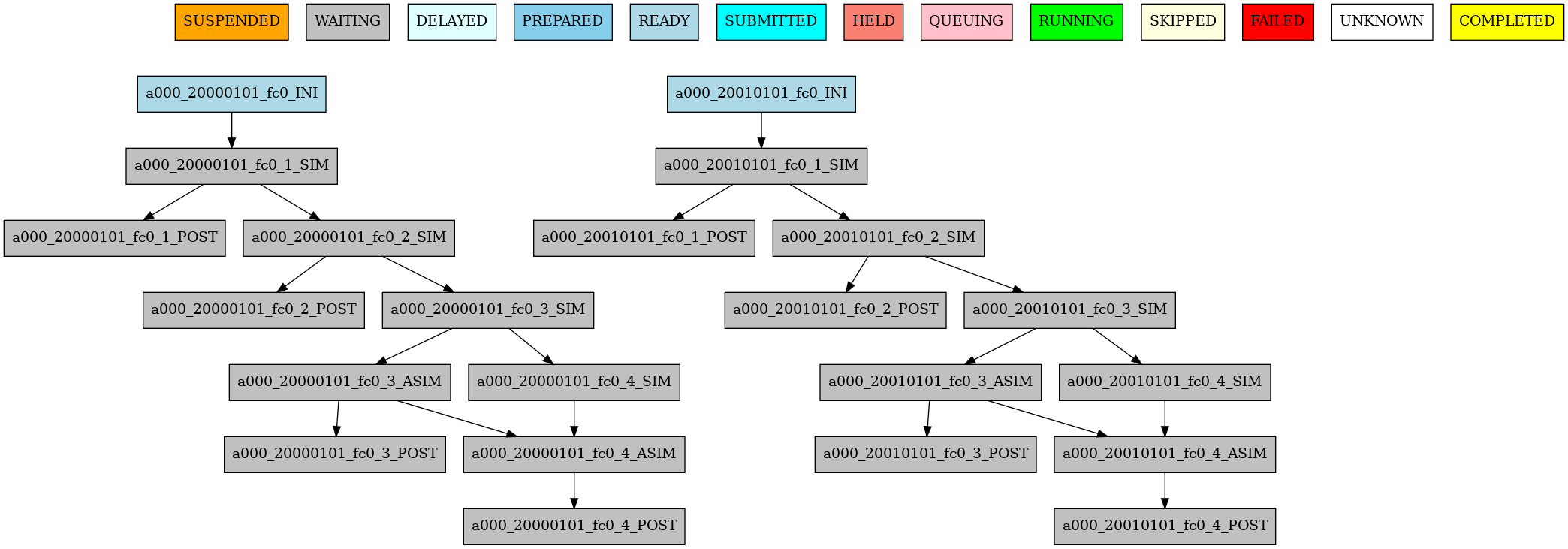
17 Example showing the asim job starting only from chunk 3.#
Loops (FOR jobs)#
The FOR key lets you generate multiple job variants from a single section.
This is useful when several jobs share the same template but differ in values such as name,
resources, or dependencies.
See also
For split-to-split dependency mapping rules, see Job split. For complete YAML examples, see Workflow examples:.
You need to use the FOR and NAME keys to define a loop.
The NAME key defines the list of suffixes used to build each generated job name.
Note
If you use a value in NAME that is not a string, like 0_2,
it will be parsed first by the YAML parser, and that value will
be converted to the string 2. To avoid issues like this, it is
recommended to wrap such values in quotes, i.e. '0_2'.
To generate the following jobs:
EXPERIMENT:
  DATELIST: 19600101
  MEMBERS: '00'
  CHUNKSIZEUNIT: day
  CHUNKSIZE: '1'
  NUMCHUNKS: '2'
  CALENDAR: standard

JOBS:
  POST_20:
    DEPENDENCIES:
      POST_20:
      SIM_20:
    FILE: POST.sh
    PROCESSORS: '20'
    RUNNING: chunk
    THREADS: '1'
    WALLCLOCK: 00:05

  POST_40:
    DEPENDENCIES:
      POST_40:
      SIM_40:
    FILE: POST.sh
    PROCESSORS: '40'
    RUNNING: chunk
    THREADS: '1'
    WALLCLOCK: 00:05

  POST_80:
    DEPENDENCIES:
      POST_80:
      SIM_80:
    FILE: POST.sh
    PROCESSORS: '80'
    RUNNING: chunk
    THREADS: '1'
    WALLCLOCK: 00:05

  SIM_20:
    DEPENDENCIES:
      SIM_20-1:
    FILE: SIM.sh
    PROCESSORS: '20'
    RUNNING: chunk
    THREADS: '1'
    WALLCLOCK: 00:05

  SIM_40:
    DEPENDENCIES:
      SIM_40-1:
    FILE: SIM.sh
    PROCESSORS: '40'
    RUNNING: chunk
    THREADS: '1'
    WALLCLOCK: 00:05

  SIM_80:
    DEPENDENCIES:
      SIM_80-1:
    FILE: SIM.sh
    PROCESSORS: '80'
    RUNNING: chunk
    THREADS: '1'
    WALLCLOCK: 00:05
One can use now the following configuration:
JOBS:
  SIM:
    FOR:
      NAME: [ 20,40,80 ]
      PROCESSORS: [ 20,40,80 ]
      THREADS: [ 1,1,1 ]
      DEPENDENCIES: [ SIM_20-1,SIM_40-1,SIM_80-1 ]
    FILE: SIM.sh
    RUNNING: chunk
    WALLCLOCK: '00:05'

  POST:
      FOR:
        NAME: [ 20,40,80 ]
        PROCESSORS: [ 20,40,80 ]
        THREADS: [ 1,1,1 ]
        DEPENDENCIES: [ SIM_20 POST_20,SIM_40 POST_40,SIM_80 POST_80 ]
      FILE: POST.sh
      RUNNING: chunk
      WALLCLOCK: '00:05'
Warning
The mutable parameters must be inside the FOR key.

18 Example showing jobs generated with the FOR key.#
Workflow examples:#
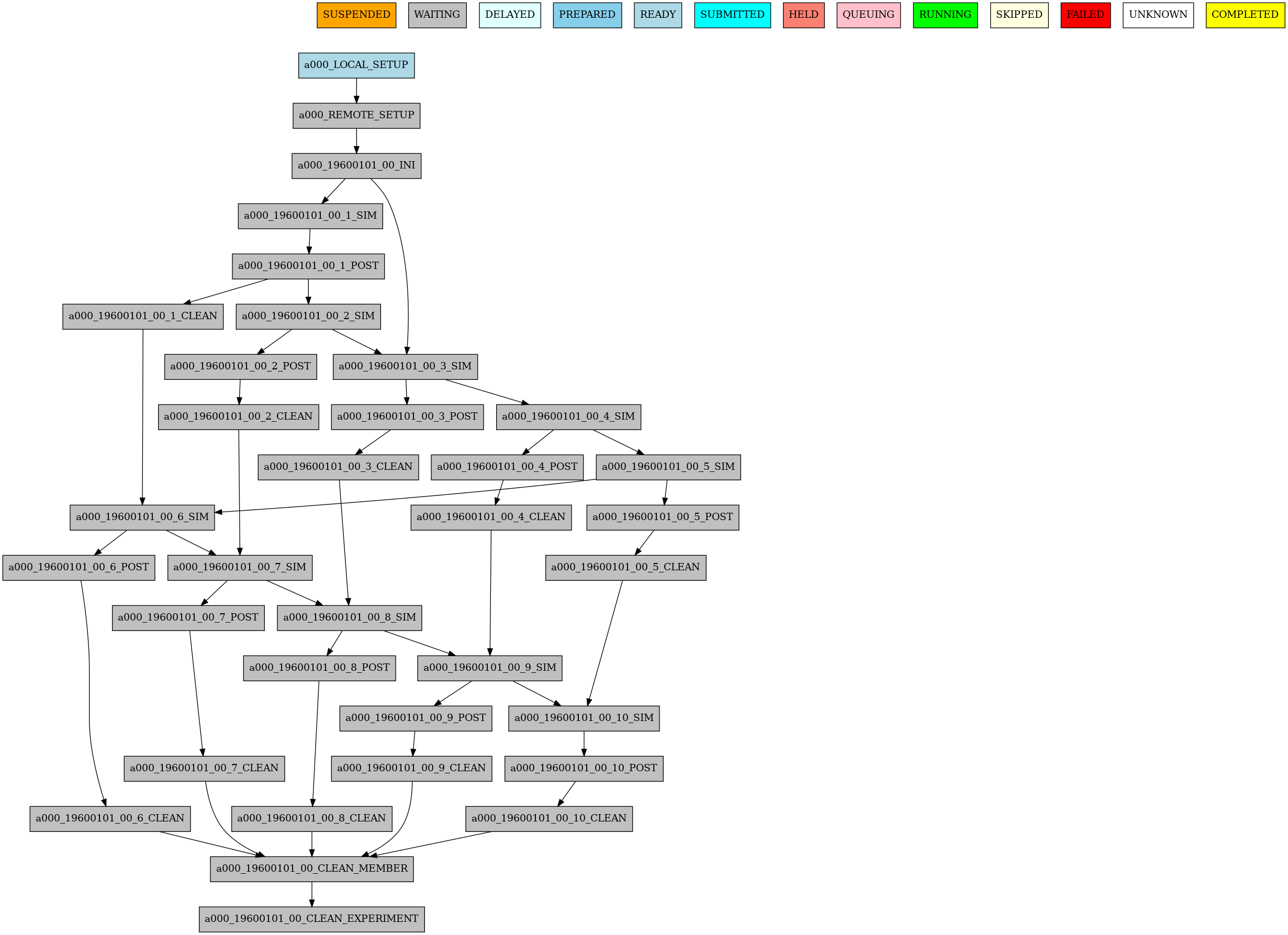
Example 1: How to select a specific chunk#
Warning
This example illustrates the old select_chunk.
EXPERIMENT:
  DATELIST: 19600101
  MEMBERS: '00'
  CHUNKSIZEUNIT: day
  CHUNKSIZE: '10'
  NUMCHUNKS: '10'
  CALENDAR: standard

JOBS:
  LOCAL_SETUP:
    FILE: LOCAL_SETUP.sh
    PLATFORM: LOCAL
    RUNNING: once
  REMOTE_SETUP:
    FILE: REMOTE_SETUP.sh
    DEPENDENCIES: LOCAL_SETUP
    WALLCLOCK: 00:05
    RUNNING: once
  INI:
    FILE: INI.sh
    DEPENDENCIES: REMOTE_SETUP
    RUNNING: member
    WALLCLOCK: 00:05
  SIM:
    FILE: templates/sim.tmpl.sh
    DEPENDENCIES:
      INI:
      SIM-1:
      POST-1:
        CHUNKS_FROM:
          all:
            chunks_to: 1
      CLEAN-5:
    RUNNING: chunk
    WALLCLOCK: 0:30
    PROCESSORS: 768
  POST:
    FILE: POST.sh
    DEPENDENCIES: SIM
    RUNNING: chunk
    WALLCLOCK: 00:05
  CLEAN:
    FILE: CLEAN.sh
    DEPENDENCIES: POST
    RUNNING: chunk
    WALLCLOCK: 00:05
  CLEAN_MEMBER:
    FILE: CLEAN_MEMBER.sh
    DEPENDENCIES: CLEAN
    RUNNING: member
    WALLCLOCK: 00:05
  CLEAN_EXPERIMENT:
    FILE: CLEAN_EXPERIMENT.sh
    DEPENDENCIES: CLEAN_MEMBER
    RUNNING: member
    WALLCLOCK: 00:05
Example 2: SKIPPABLE#
In this workflow you can see an illustrated example of SKIPPABLE parameter used in an dummy workflow.
EXPERIMENT:
  DATELIST: 19600101 19650101 19700101
  MEMBERS: fc0 fc1
  CHUNKSIZEUNIT: month
  SPLITSIZEUNIT: day
  CHUNKSIZE: 1
  SPLITSIZE: 1
  SPLITPOLICY: flexible
  NUMCHUNKS: 4
  CALENDAR: standard

JOBS:
  SIM:
    FILE: sim.sh
    DEPENDENCIES: INI POST-1
    WALLCLOCK: 00:15
    RUNNING: chunk
    QUEUE: debug
    SKIPPABLE: TRUE

  POST:
    FILE: post.sh
    DEPENDENCIES: SIM
    WALLCLOCK: 00:05
    RUNNING: member

19 Example showing the asim job starting only from chunk 3.#
Example 3: Weak dependencies#
In this workflow you can see an illustrated example of weak dependencies.
Weak dependencies, work like this way:
X job only has one parent. X job parent can have
COMPLETEDorFAILEDas status for current job to run.X job has more than one parent. One of the X job parent must have
COMPLETEDas status while the rest can beFAILEDorCOMPLETED.
EXPERIMENT:
  DATELIST: 2021102412
  MEMBERS: MONARCH SILAM CAMS
  CHUNKSIZEUNIT: month
  SPLITSIZEUNIT: day
  CHUNKSIZE: 1
  SPLITSIZE: 1
  SPLITPOLICY: flexible
  NUMCHUNKS: 1
  CALENDAR: standard

JOBS:
 GET_FILES:
   FILE: templates/fail.sh
   RUNNING: chunk

 IT:
   FILE: templates/work.sh
   RUNNING: chunk
   QUEUE: debug

 CALC_STATS:
   FILE: templates/work.sh
   DEPENDENCIES: IT GET_FILES ?
   RUNNING: chunk
   SYNCHRONIZE: member

20 Example showing the asim job starting only from chunk 3.#
Example 4: Select a member#
In this workflow you can see an illustrated example of select member. Using 4 members 1 datelist and 4 different job sections.
EXPERIMENT:
  DATELIST: 19600101
  MEMBERS: '00 01 02 03'
  CHUNKSIZE: 1
  NUMCHUNKS: 2
  CHUNKINI: ''
  CALENDAR: standard

JOBS:
    SIM:
        RUNNING: chunk
        QUEUE: debug

    DA:
        DEPENDENCIES:
            SIM:
                members_from:
                    all:
                        members_to: 00,01,02
        RUNNING: chunk
        SYNCHRONIZE: member

    REDUCE:
        DEPENDENCIES: SIM
        RUNNING: member
        FREQUENCY: 4

    REDUCE_AN:
        FILE: templates/05b_sim.sh
        DEPENDENCIES: DA
        RUNNING: chunk
        SYNCHRONIZE: member

21 Example showing the asim job starting only from chunk 3.#